Fast answer: how Make operations work
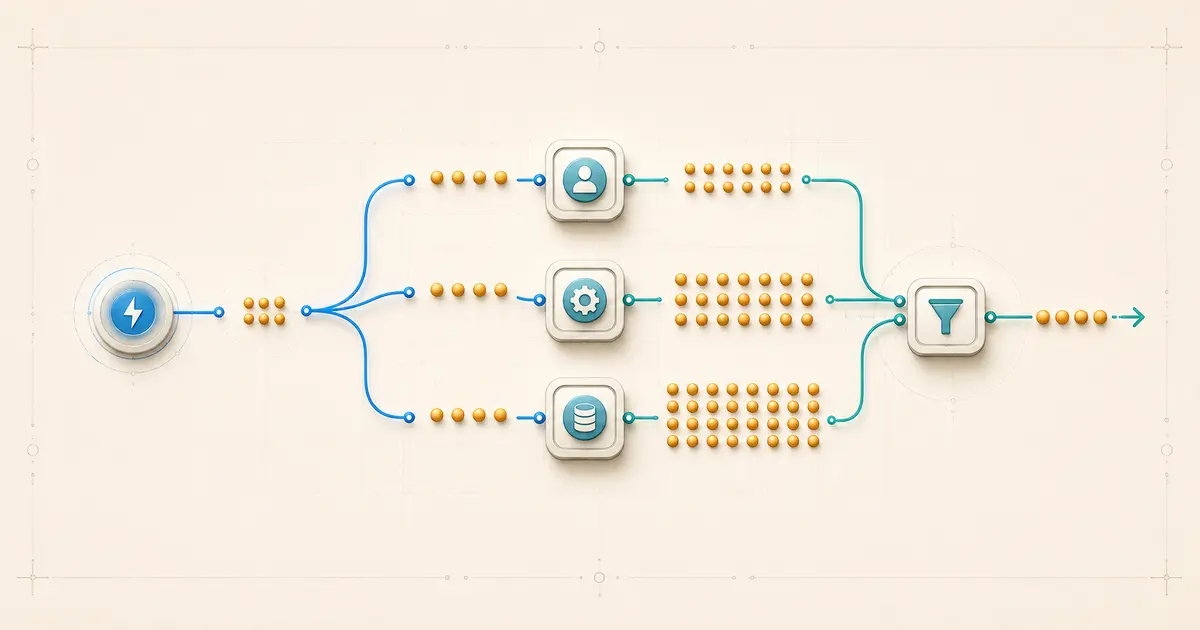
A Make scenario can use far more operations than it appears to “run once,” because modules generally process bundles — containers of related data — separately, and bundles introduced early in a route multiply work downstream. Make’s documented example: a trigger returning 10 bundles followed by three modules that each process all 10 produces 31 operations (1 + 10 + 10 + 10), not 4. Trigger and search modules count once per run regardless of bundles returned; action modules count per input bundle, while an iterator adds a split step and multiplies the downstream work. Estimate usage by counting module runs per route, not modules per scenario.
Documentation verified 6 August 2026
Plain-language definitions
Six terms carry most of the weight in this guide. For a broader orientation to Make on MetaFlowKit, see the Make platform hub.
- Scenario run — one execution of your automation, from its trigger through every module it reaches.
- Module — a single step in a scenario, such as a trigger, search, action, router, or aggregator.
- Operation — a single module run that processes or checks data. A module can run more than once within a single scenario run, once per bundle it processes, so one scenario run can contain many operations.
- Bundle — a container of related data items, such as one email, one contact, or one file. Bundles are the unit modules process one at a time.
- Data item — an individual piece of data inside a bundle, such as a contact’s first name or email address.
- Credit — the unit Make bills for. For non-AI apps, 1 operation equals 1 credit by default; AI-related features and Make’s Code app follow different, documented rules and are not always exactly 1 credit per operation.
How bundles move through a simple linear scenario
A trigger module starts a scenario run by retrieving bundles from an external source — new form responses, new rows, new emails, and so on. Whatever bundles the trigger returns become the input bundles for the next module.
Modules generally process each bundle separately, meaning each bundle triggers its own module run. If a module in the route receives 10 input bundles, it runs 10 times to process them, producing 10 operations of whatever action it performs — not one combined run.
This is why bundle counts multiply downstream. A trigger returning many bundles causes every subsequent module in that route to run once per bundle, and that multiplied run count carries forward to whatever comes after it, unless something in between changes the bundle count — an aggregator collapsing many bundles into one, a filter dropping some bundles, or a router sending only some bundles down a given path.
The trigger itself is a documented exception to the “one run per bundle” pattern: a trigger module runs once per scenario execution to check for or retrieve data, and that single run counts as one operation regardless of how many bundles it returns. Search modules follow the same one-run rule even though they can return multiple bundles in a single run. The multiplying effect starts with the modules that come after the trigger or search step, not with the trigger or search step itself.
The worked 31-operation example
Make’s own documentation walks through this scenario: a trigger watches a form for new responses, then the scenario creates a document for each response, downloads it, and emails it to the respondent. In one run, the trigger returns 10 new bundles.
Trigger: 1 run → 1 operation
Document-creation module: 10 bundles → 10 operations
Download module: 10 bundles → 10 operations
Email module: 10 bundles → 10 operations
Total: 1 + 10 + 10 + 10 = 31 operations
The arithmetic is simple once you separate the trigger’s single run from the per-bundle runs of everything after it: one operation for the trigger’s single check, then 10 operations for each of the three downstream modules, because each of those modules processes the 10 bundles the trigger returned. This is the pattern to recognize before assuming a scenario that “runs once” costs a fixed, small number of operations — the real count depends on how many bundles enter the route and how many modules those bundles pass through.
A general estimation method
This is an estimation method, not a formula Make guarantees will match your actual usage — treat it as a planning tool, then confirm against your scenario’s own history. MetaFlowKit’s Automation Usage Calculator can help turn a per-run estimate like this into a monthly projection.
- List every module in the route, in order, including the trigger.
- For the trigger and any search module, count 1 operation regardless of how many bundles it returns.
- For every other module in that route, estimate the number of bundles it will receive as input, and count that many operations.
- Where a router splits the route, count every branch whose filter accepts the bundle. A standard Make router evaluates its routes in order, and the same bundle can continue through more than one matching route; only an if-else flow is exclusive to the first matching condition.
- Where a filter removes bundles, reduce the downstream bundle count from that point forward.
- Where an iterator or aggregator changes the bundle count, adjust from that point forward using their documented behavior, covered in the comparison table below.
- Sum the per-module operation estimates for the whole route.
This method estimates a single run’s operation count. Multiply by expected runs per period, per day or per month, for a usage estimate, and remember that retries, errors, and incomplete executions can add operations a simple bundle count won’t predict.
Exact comparison: how each module type counts
This table is limited to what current official documentation supports for each module type.
| Module type | Documented counting behavior | Notes |
|---|---|---|
| Trigger | 1, regardless of bundles returned | Counts as 1 operation even if it finds no new data |
| Search | 1, regardless of bundles returned | Runs once even when it returns multiple bundles |
| Action | 1 per input bundle processed | Runs once for each bundle it receives |
| Iterator | 1 to split the array, then downstream modules run once per emitted bundle | Converts one array into multiple bundles |
| Aggregator | 1 per aggregation | Combines multiple input bundles into a single output bundle |
| Router | No credit cost documented for the router itself | Count downstream modules on every route whose filter accepts the bundle; routes run sequentially |
| Filter | No credit cost documented for the filter itself | Reduces the bundle count passed to whatever comes after it |
Three worked models
These use synthetic, round numbers to illustrate the counting rules. They are not reports of an executed scenario.
Model 1: linear trigger plus actions
Assume a trigger returns 20 bundles, followed by two action modules that each process all 20.
Trigger: 1 operation
Action module 1: 20 operations
Action module 2: 20 operations
Total: 41 operations
Model 2: iterator expanding an array
Assume a trigger returns 1 bundle containing an array of 15 items, an iterator splits that array, and one action module processes each resulting bundle.
Trigger: 1 operation
Iterator: 1 operation to split the array into 15 bundles
Action module: 15 operations, one per emitted bundle
Total: 17 operations
Compare this to Model 1: the same starting point of a single trigger bundle produced far more downstream operations once an iterator expanded it into 15 separate bundles.
Model 3: aggregator before a downstream summary action
Assume a search module returns 12 bundles, an aggregator combines them into a single array bundle, and one summary action module processes that one combined bundle.
Search: 1 operation, regardless of the 12 bundles returned
Aggregator: 1 operation to combine the 12 bundles into one
Summary action module: 1 operation, processing the single aggregated bundle
Total: 3 operations
This is the shape of the optimization Make’s own documentation describes: replacing several separate per-contact emails with one aggregated email dropped a comparable scenario from 11 operations to 3. The saving depends on the aggregator and every module around it being counted — not just assumed.
Why actual totals differ from the estimate
- Filtering and branching. A filter can reduce the bundle count, while a router can send the same bundle through multiple matching routes. Both change every downstream module count, so estimate each route separately and add the results.
- Retries and errors. A module that errors and retries can add operations beyond what a clean, single-pass estimate predicts.
- Module type. Confusing a search module, 1 operation regardless of bundles, with an action module, 1 operation per bundle, is a common source of estimate error.
- AI and code-execution credit rules. Make documents that AI-related features and the Code app don’t follow the flat 1-credit-per-operation rule — some use dynamic, token-based, file-size-based, or time-based credit consumption instead, so an operation count alone won’t predict the credit cost for those modules.
- Bundles that stop before later modules. If earlier modules or filters remove bundles entirely, later modules in the route simply don’t run for those bundles, which lowers the total below what a naive per-module estimate assumes.
Because of these factors, treat any pre-run count as a planning estimate and confirm the real number in scenario history after the scenario actually runs.
A safe optimization checklist
Reduce operations without breaking what the scenario is actually supposed to do.
- Correctness first. Never aggregate emails, payments, or per-record API actions purely to reduce operations if the destination genuinely requires a separate call per record — a lower operation count is not worth a broken integration.
- Select only the fields and events you need. Configure triggers and searches to return only relevant data, reducing bundle counts before they multiply downstream.
- Filter earlier in the route. Removing bundles that don’t need processing before they reach several downstream modules avoids paying for their operations repeatedly.
- Aggregate where the destination allows a combined call. Use an array or text aggregator ahead of a module that can accept multiple records in a single call.
- Batch only where the destination API actually supports batching. Combining calls that the receiving system still processes one at a time doesn’t reduce real work — confirm the API’s own batch support before redesigning around it.
- Measure the result. Compare actual operations in scenario history before and after the change, rather than assuming the estimate held.
How to verify the estimate in scenario history
- Open the scenario’s History tab and select the specific run you want to inspect
- Click the white operation-count bubble above each module to see its operations for that run
- Expand an individual operation to view the bundles it processed
- Expand a bundle to see the data items it contains, confirming the module received what you expected
- Toggle on credits next to the scenario name if you need the credit total alongside the operation count
The dashboard and history are the source of truth for actual usage — everything in the worked models above is an estimate to plan against, not a substitute for checking the real run.
Rollback and safety note
Frequently asked questions
Does every operation cost exactly 1 credit?
Not always. Non-AI apps generally use 1 credit per operation by default, but Make documents exceptions — AI-related features and the Code app follow different, sometimes dynamic, credit rules based on tokens, file size, pages, or execution time.
Do routers and filters consume credits?
Make’s documentation lists routers and filters among the modules with no credit cost themselves. Downstream modules still consume operations based on whichever bundles actually pass through to them.
Why did my scenario use more operations than my estimate?
Common causes include retries after errors, a search module miscounted as an action module in your estimate, or AI and code modules whose credit usage isn’t a flat per-operation rate.
Does an aggregator always reduce total operations?
Not automatically. It reduces the bundle count for whatever comes after it, but you still have to count the aggregator’s own operation and everything upstream that produced the bundles it combined before claiming a lower total.
Does clicking Stop immediately cancel a running module?
No. Make’s documentation states that the module currently running finishes processing all of its bundles before the scenario actually stops; modules after it in the route do not run.
Sources and change log
- Make Help Center: Operations
- Make Help Center: Credits & operations
- Make Help Center: How features use credits
- Make Help Center: Scenario execution flow
- Make Help Center: Flow control
- Make Help Center: Router
- Make Help Center: Aggregator
- Make Help Center: Scenario execution, cycles, and phases
Change log: Initial publication, 6 August 2026.