Why the webhook appears to fire twice
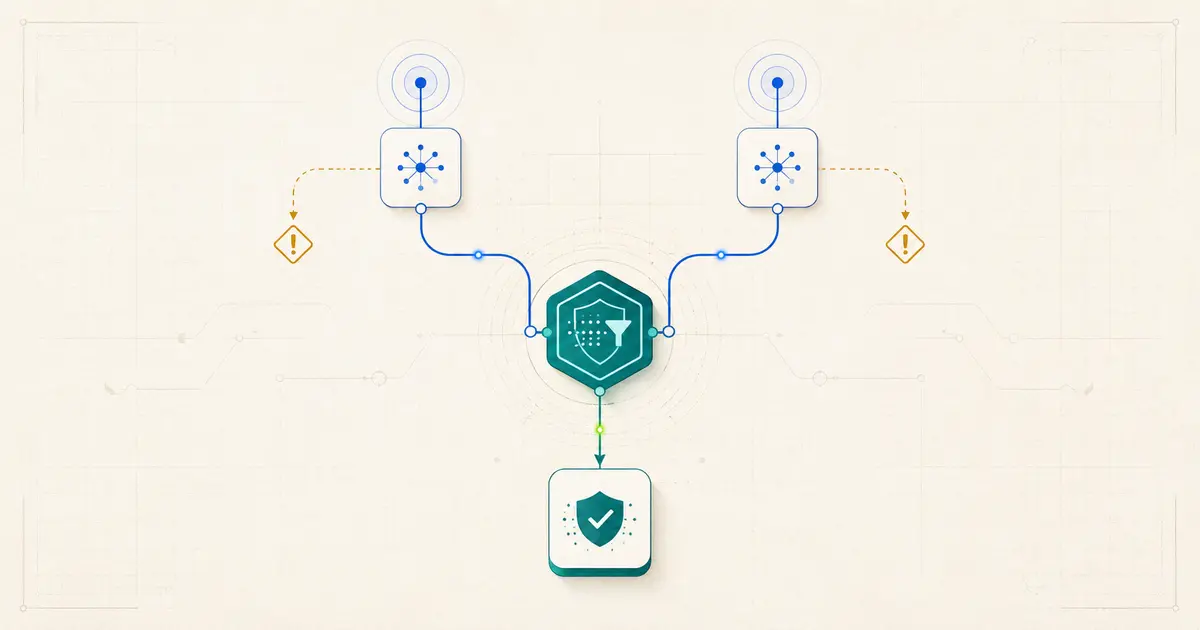
If your n8n webhook workflow runs twice, first confirm whether you have two executions or two items inside one execution. Two executions show that two trigger deliveries reached the workflow; they do not, by themselves, prove an n8n bug. Compare the provider’s event or delivery ID, timestamps, headers, endpoint registrations, and delivery logs. The dependable fix is to validate the request, acknowledge it within the provider’s required window, and gate the real side effect behind an idempotency check—a check that makes a repeated delivery harmless.
Start at the execution boundary
Confirm whether you have two executions or two items
Open the workflow’s execution history before changing any nodes. Two execution entries and two items inside one execution are different faults, so they need different investigations.
Two executions mean the Webhook node was triggered twice. Each entry has its own execution ID, timestamp, and complete workflow run. This shows that two trigger deliveries reached the workflow, but it does not identify who sent the second request or why. A provider retry, a duplicate endpoint registration, a second client, or a callback loop can all produce that pattern.
Two items inside one execution point somewhere after the trigger. A single request creates one execution, but a Split Out, Code, Merge, or other transformation produces two items before the side effect. In that case, trace item counts node by node. A cross-execution event-ID guard is not the first fix because the duplication is already happening inside one run.
The distinction sounds small, but it prevents hours of debugging the wrong boundary. For more platform-specific field notes, use the n8n guide hub.
Evidence before a cause
Compare the two deliveries side by side
Once you confirm two executions, inspect both before assigning a cause. The most useful comparison points are:
- Event or delivery ID: the same stable ID usually indicates a redelivery of one event; different IDs can represent two legitimate events that merely look alike.
- Timestamps: a short gap can be consistent with a quick retry or two registrations, while a longer gap may reflect scheduled redelivery. Timing is a clue, not proof.
- Headers: compare the complete request headers and look for the provider’s documented delivery identifier, event type, signature, or attempt metadata.
- Source delivery logs: inspect the provider’s own webhook log for the number of attempts, response status, timestamp, and any failure or resend marker.
- Registered endpoints: list the provider’s configured webhook destinations and check whether the same n8n Production URL appears more than once.
Field names vary by provider. Confirm the documented stable identifier on a real delivery instead of assuming that every service uses event_id or places it in the same part of the payload.
Six patterns, six checks
Root-cause matrix
n8n intentionally gives a Webhook node separate Test and Production URLs. The Test URL is for development while the editor is listening for a test event. The Production URL is for a published workflow. Merely having both URLs does not create a duplicate; two clients or test paths must actually call them. Check every sender during migrations and retests.
What MetaFlowKit actually tested
Reproducible MetaFlowKit lab
4 August 2026
n8n Cloud 2.33.3
Stable channel
Synthetic data
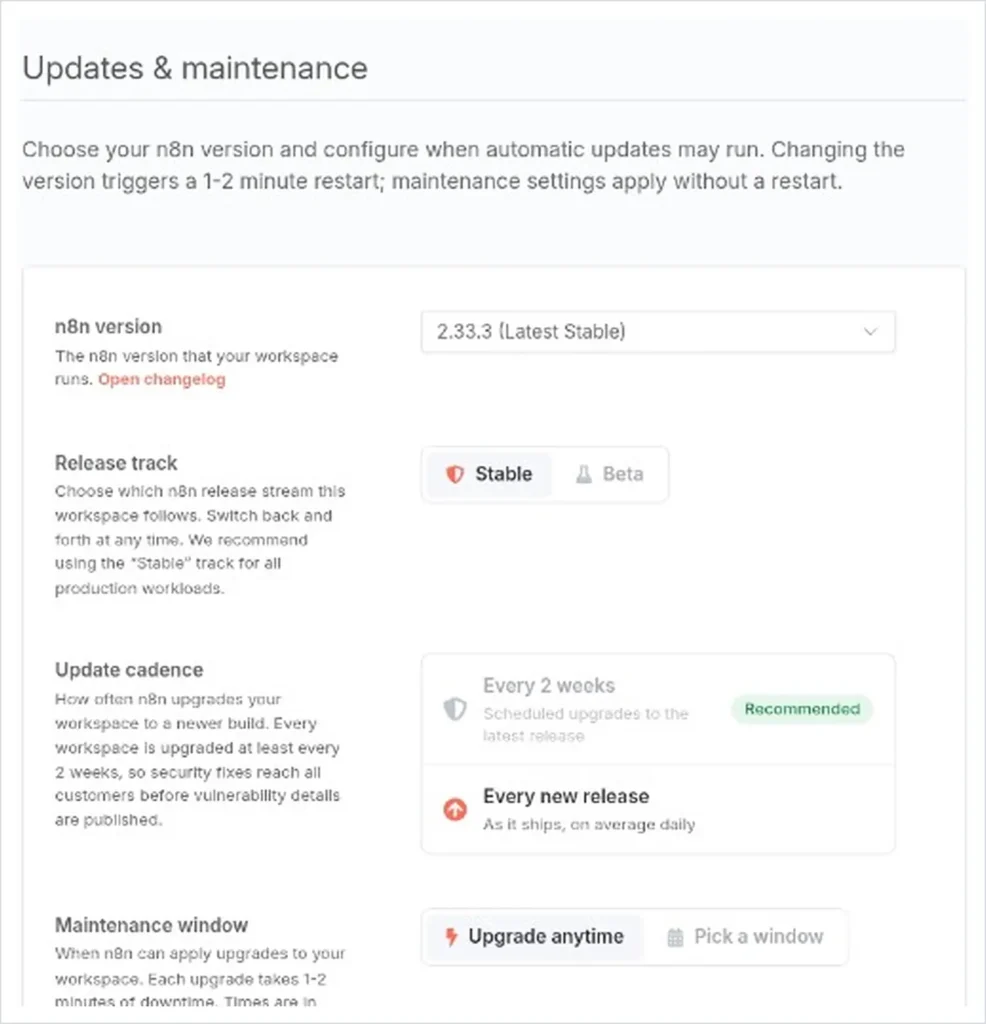
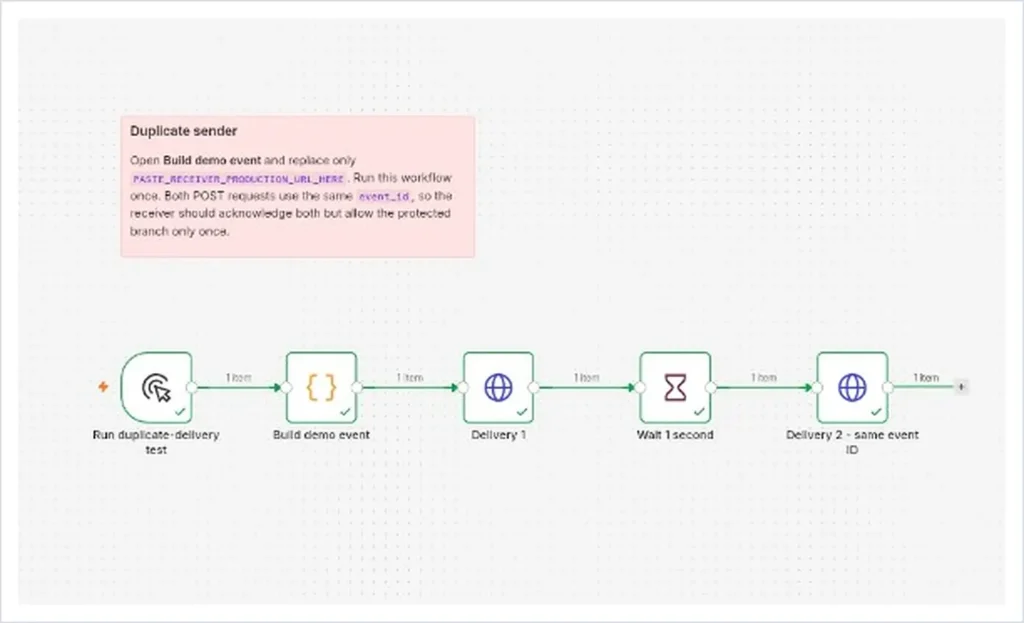
We used two workflows. An unpublished Manual Trigger workflow deliberately sent two POST requests one second apart. Both requests carried the same synthetic event ID, mwf-demo-001. This was not a simulation of any provider’s retry policy; it was a controlled way to place the same event in front of a receiver twice.
The receiver was a published Production webhook workflow. It contained a Webhook node, an early Respond to Webhook step, a Code node that normalized the event ID, a Remove Duplicates node named Keep new event IDs, and a protected action. The workflow was configured to acknowledge with status 202; the screenshots show successful workflow execution and path behavior, not a raw HTTP response captured on the wire.
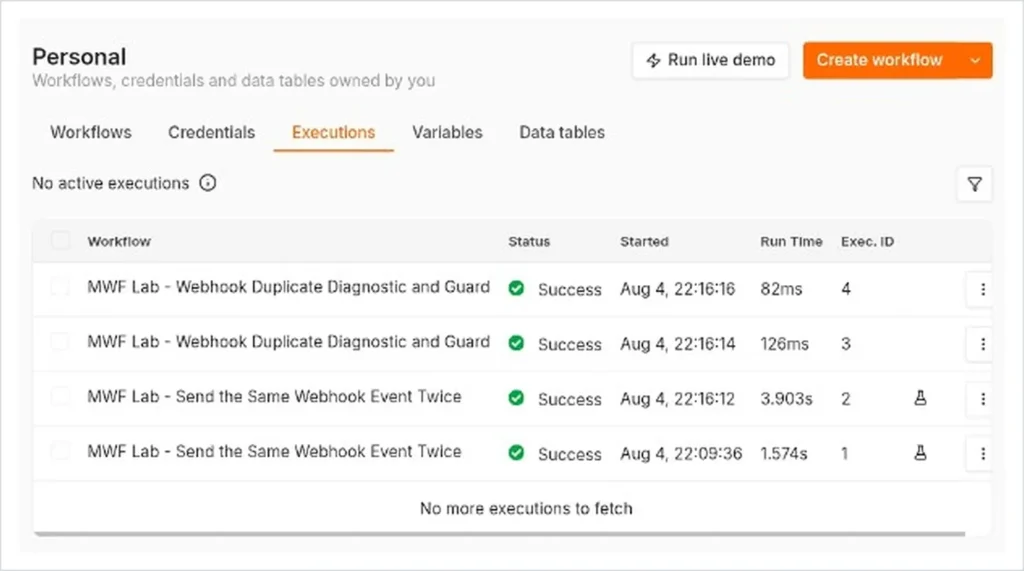
Execution 3 began at 22:16:14. The first mwf-demo-001 item passed the cross-execution guard and reached Protected action runs once. Execution 4 began at 22:16:16 with the same ID. It reached Keep new event IDs, produced no new item beyond that node, and did not run the protected action again.
The result proves one narrow point: two deliberately sent requests created two receiver executions, while the downstream protected action ran once. It does not prove that n8n spontaneously creates duplicate requests, explain a real provider’s retry, validate signatures, or demonstrate safety under high concurrency, queue mode, or multiple workers.
A reliability pattern, not one switch
Use acknowledgement and idempotency together
Idempotency means that processing the same event again does not repeat the business effect. It does not stop the second HTTP request from reaching n8n; it stops that request from charging, emailing, updating, or creating something twice.
- 01
Authenticate and validate the request
Follow the provider’s required signature or authentication process before trusting the payload. A fast response never replaces verification. If validation requires the raw request body, preserve it in the form the provider documents.
- 02
Acknowledge within the provider’s window
Keep the webhook response path short. GitHub, for example, documents that a receiver should return a 2xx response within 10 seconds. Stripe also recommends returning a successful status before complex downstream work. Check the rule for your own provider.
- 03
Normalize a stable event ID
Map the provider’s durable event or delivery identifier into one consistent field. Reject or quarantine requests that should contain an ID but do not; do not silently invent an ID from a volatile timestamp.
- 04
Deduplicate across executions
Configure the Remove Duplicates node to compare the normalized value with data from previous executions. This is a practical short-window guard for many workflows, not a permanent business ledger.
- 05
Put the real side effect after the guard
Connect the email, record update, notification, or other protected action only after the path that still contains a new item. No business side effect should run before request validation and the idempotency decision.
- 06
Retain evidence without inventing a discard output
The Remove Duplicates operation used in this lab filtered the repeated item, so no item continued to a separate discard node. Use saved execution history or explicit logging before the guard when you need an audit trail, and confirm that the logging design does not create another side effect.
If repeat deliveries materially affect monthly usage, estimate the impact with MetaFlowKit’s Automation Usage Calculator.
Prove the side effect stayed single
Verification procedure
Send the same synthetic event twice with a short gap. Then inspect both receiver executions and the real destination of the protected action. A green webhook response alone does not prove that the business effect happened only once.
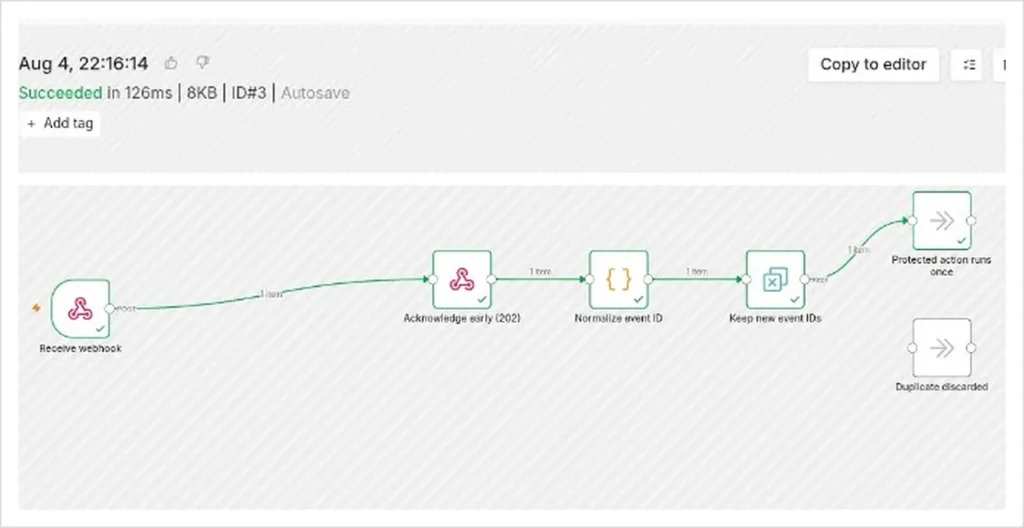
mwf-demo-001 as new and allowed the protected action.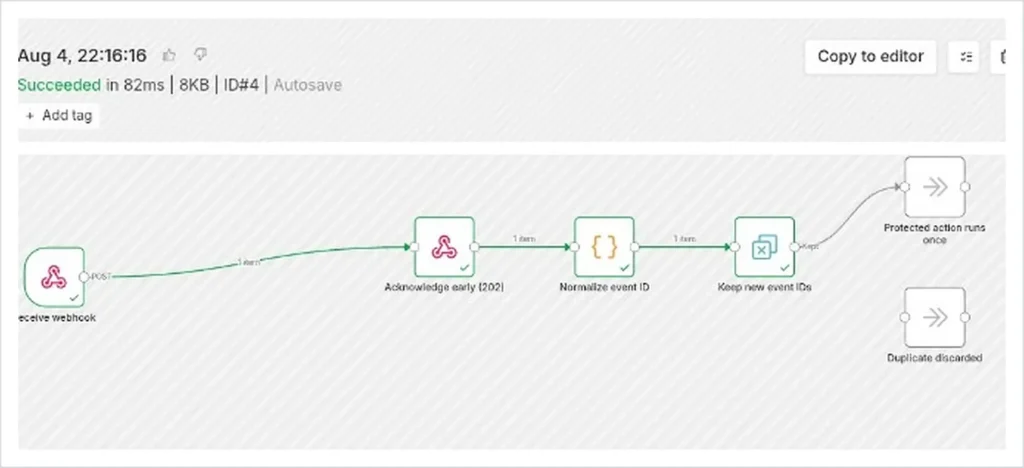
- Two entries appear in the receiver’s execution history with distinct execution IDs and timestamps.
- The first execution passes the normalized event ID to the protected action.
- The second execution reaches the deduplication guard but produces no new item beyond it.
- The protected action remains inactive in the second execution.
- The destination confirms one email, record change, charge, or other business effect—not two.
Where the simple guard stops being enough
Edge cases and production limits
- Missing or unstable IDs: check the provider’s documentation for its durable identifier. Do not deduplicate on a request timestamp or another value that changes on every delivery.
- Finite history: previous-execution comparison is not an unlimited compliance or billing record. Configure and review the node’s history scope for the retry window you actually need.
- Cleared or changed history: clearing the node’s stored deduplication history or changing the comparison configuration can make a previously seen value look new again. Re-test after either change.
- Legitimate similar events: two valid updates to the same object may look identical at a glance. Compare the actual event IDs and event types instead of payload similarity alone.
- Composite keys: Stripe notes that two separate Event objects can sometimes represent an apparent duplicate. Its guidance recommends combining the affected object’s ID with the event type for that case.
- Concurrency and queue mode: do not assume that a recent-history check is an atomic lock across simultaneous workers unless you have tested that exact architecture.
- High-value side effects: payments, entitlements, inventory, and other sensitive actions may need a durable datastore that atomically inserts a unique idempotency key. That is a production design consideration, not a result proven by this lab.
- Reconciliation: periodically compare processed-event records with the provider’s delivery log when a missed or repeated event has material consequences.
Short answers
Frequently asked questions
Is a webhook firing twice an n8n bug?
Not from this symptom alone. Two executions show two trigger deliveries reached the workflow. Compare provider logs, IDs, registrations, and callbacks before blaming the platform.
Can the Test and Production URLs both receive requests?
Yes, when separate clients or tools call them under their documented modes. Their existence alone does not duplicate an event; check which sender is using each URL.
How long does Remove Duplicates remember an event?
Its previous-execution comparison uses configured stored history rather than an unlimited ledger. Review the current node settings and retest them against your provider’s retry window.
Does a quick response replace signature verification?
No. Authentication or signature validation establishes that the request is trustworthy; prompt acknowledgement reduces delivery failures. You need both when the provider requires verification.
What if the provider does not send a stable event ID?
Check its official webhook documentation first. For sensitive actions, route missing identifiers to review or use a documented composite key instead of guessing from volatile fields.
Primary documentation
Sources and change log
4 August 2026 — Initial publication based on the controlled MetaFlowKit n8n Cloud 2.33.3 lab.